CUSTOMER SUPPORT KNOWLEDGE
Build a Reusable Customer Support Answer Library
A good answer library is not a folder of copied emails. It is a reviewed collection of reusable facts and instructions that can be safely adapted to the customer’s current question.
Write customer-neutral answers
Remove names, greetings, ticket numbers, order details, and emotional commentary. Store the durable explanation or procedure, then personalize it only when composing the reply.
A reusable entry should still make sense six months later when a different customer asks the same question.
Add the ways customers actually ask
Customers rarely copy the wording from documentation. Record a few realistic question variations: formal, casual, short, and problem-focused.
Variations help the system find the right knowledge without duplicating the answer itself.
Tag the scope precisely
Record the product, plan, category, version limits, and source. If an answer applies only to Pro or depends on WooCommerce, say so in the entry rather than relying on the agent to infer it.
Narrow, accurate knowledge beats a large library of vague answers.
Keep the source beside the answer
Link to the relevant documentation page, policy, release note, or internal decision. When the answer changes, the reviewer can see why it existed and what must be updated.
Imported documentation should enter a review step before becoming trusted support knowledge.
Retire stale answers
Review entries when a product changes, a setting is renamed, a price or policy changes, or a recurring ticket contradicts the stored answer. Archive or replace outdated knowledge rather than keeping multiple conflicting versions.
Approved replies can reveal useful additions, but automatic learning should never silently overwrite a human-authored source.
How to Stop Answering the Same Customer Support Questions Repeatedly
Build a reusable answer library from the questions customers actually ask. Review the facts once, keep their scope clear, and stop rewriting the same explanation for every ticket.
Find the questions that consume your time
Start with a small sample of recent support messages. Group requests by the customer’s goal: installation, a missing setting, an order status, or an explanation of Free versus Pro. Count repeated problems rather than repeated words. Two customers can use different language for the same issue, while two nearly identical messages can require different answers.
Choose five recurring, low-risk questions first. Setup locations and links to current documentation are better starting points than refunds, exceptions, or diagnosis of possible data loss. You do not need a giant library before it becomes useful.
Write one answer that stands on its own
A reusable answer should explain where to go, what to do, and how to check whether it worked. Remove names, greetings, order numbers, passwords, and any special arrangement made for one customer. Separate a durable product rule from a one-off decision.
For example, a fictional customer asks where to place a Weekly Menu Manager menu. A useful reusable answer identifies the Dashboard’s menu-page workflow and the current shortcode, [wizehawk_weekly_menu], for an existing WordPress page. It should also link to the setup guide. “Go into settings and add it” is too vague to save either person time.
Store the source and the conditions that make the answer correct. If a procedure needs WooCommerce, says something about Pro, or applies to a particular version, put that in the answer. Do not assume the person—or AI—using it will infer the limitation.
Add realistic question variations
A customer might ask “Where does my menu go?”, “How do I show this on my website?”, or “Can I use my existing menu page?” Those may fit one answer. “Why did yesterday’s menu disappear?” is a scheduling diagnosis and should not be matched merely because it contains the word menu.
Add a few genuine variations rather than every keyword you can think of. Overly broad variations make a library look comprehensive while increasing wrong matches. Keep distinct problems separate, even if the same product is involved.
Put the answer into AnswerHawk
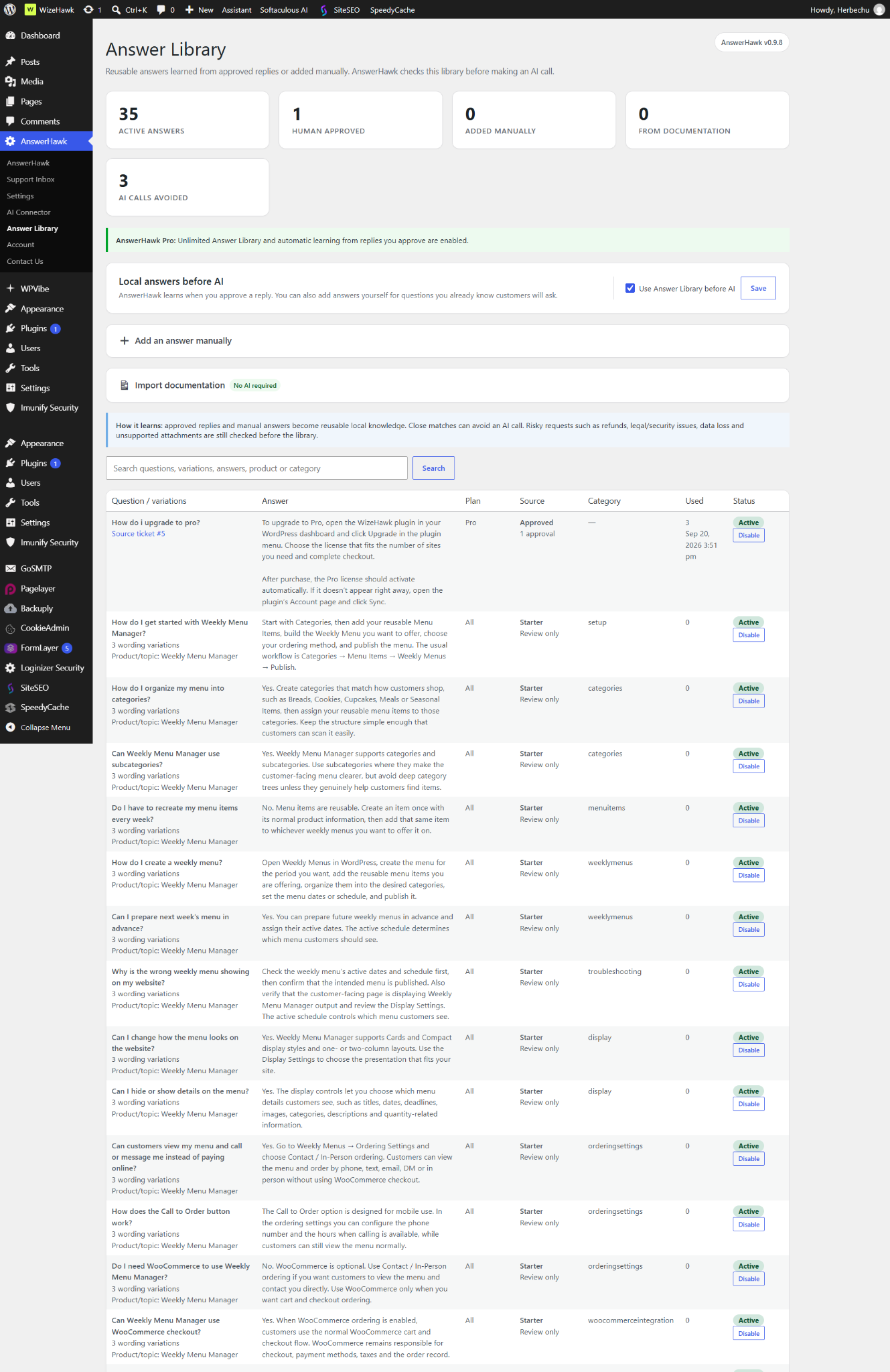
- Open AnswerHawk → Answer Library and enable Use Answer Library before AI, then save.
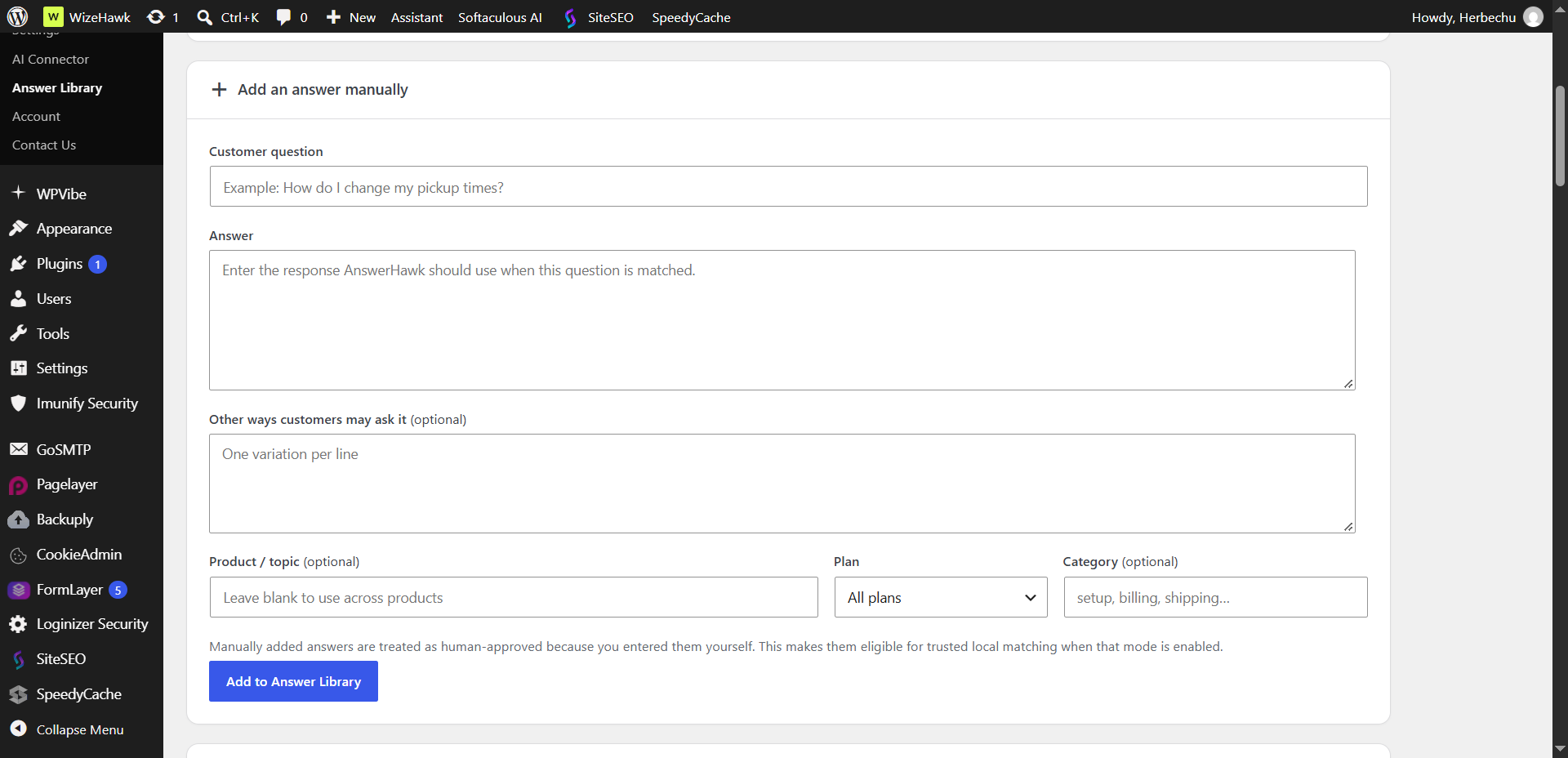
- Expand Add an answer manually. Enter Customer question and the verified Answer.
- Add alternative phrasings under Other ways customers may ask it, one per line.
- Set Product / topic, the applicable plan, and a useful Category.
- Click Add to Answer Library, then test a new phrasing with a controlled support ticket.
These labels refer to AnswerHawk 0.9.11. Free supports up to 25 stored library entries; Pro removes that limit. A small Free library is enough to test whether this approach fits your inbox. AI-generated drafts require a configured provider and may incur provider charges.
Review before you automate
Use Review — create drafts, never send while testing. Send a realistic question from a mailbox you control, synchronize the inbox, process waiting tickets, and inspect the proposed answer. Confirm the product, plan, wording, and link before sending a reply.
Test three cases: a clear match, a different phrasing, and a related question the answer does not cover. The last case matters most. A system that confidently reuses the wrong answer creates more support work than a system that asks a person to review it.
Manually entered and reviewed imported answers count as approved knowledge. Approval is a responsibility, not a quality guarantee. Trusted and Autopilot are Pro workflows; neither should be enabled merely because five easy tests worked.
Import knowledge without importing confusion
AnswerHawk can scan a public documentation page or supported HTML, TXT, Markdown, and DOCX files. Version 0.9.11 handles one web page per scan; it is not an ongoing whole-site synchronization service. Review the import preview and select only current, complete answers.
Clear question headings and explicit Question/Answer sections help extraction. Remove menu labels, navigation fragments, outdated instructions, and conflicting answers. For the full process, see grounding support replies in documentation.
Reduce the reason people need to ask
A library saves reply-writing time, but the better long-term fix may be clearer product instructions. If the same setup question keeps arriving, put the answer near the setting, in onboarding, or in the public guide. Link the support answer to that improved source.
Track repeat questions and whether customers need another reply after receiving the answer. That is more useful than counting stored entries. Review the library when a release changes labels or behavior. Pro learning from eligible approved replies can help build knowledge, but sensitive cases are excluded and stored knowledge still needs review.
Start with five answers
Pick five recurring questions, write accurate reusable answers, and test them in Review mode. AnswerHawk brings the inbox and Answer Library into WordPress. Follow the complete setup and support guide for installation, provider configuration, limits, and release status.
RELATED ANSWERHAWK GUIDES